

- AI Tools
- Artificial Intelligence
What Is OpenAI Daybreak Blue? Codex Access, Pricing, and Red vs. Blue Explained
Daybreak Blue is not a secret new GPT. It is OpenAI's approval-gated access tier for defensive security work in Codex and the API. Here is what it unlocks, what it costs, and how it differs from Daybreak Red.
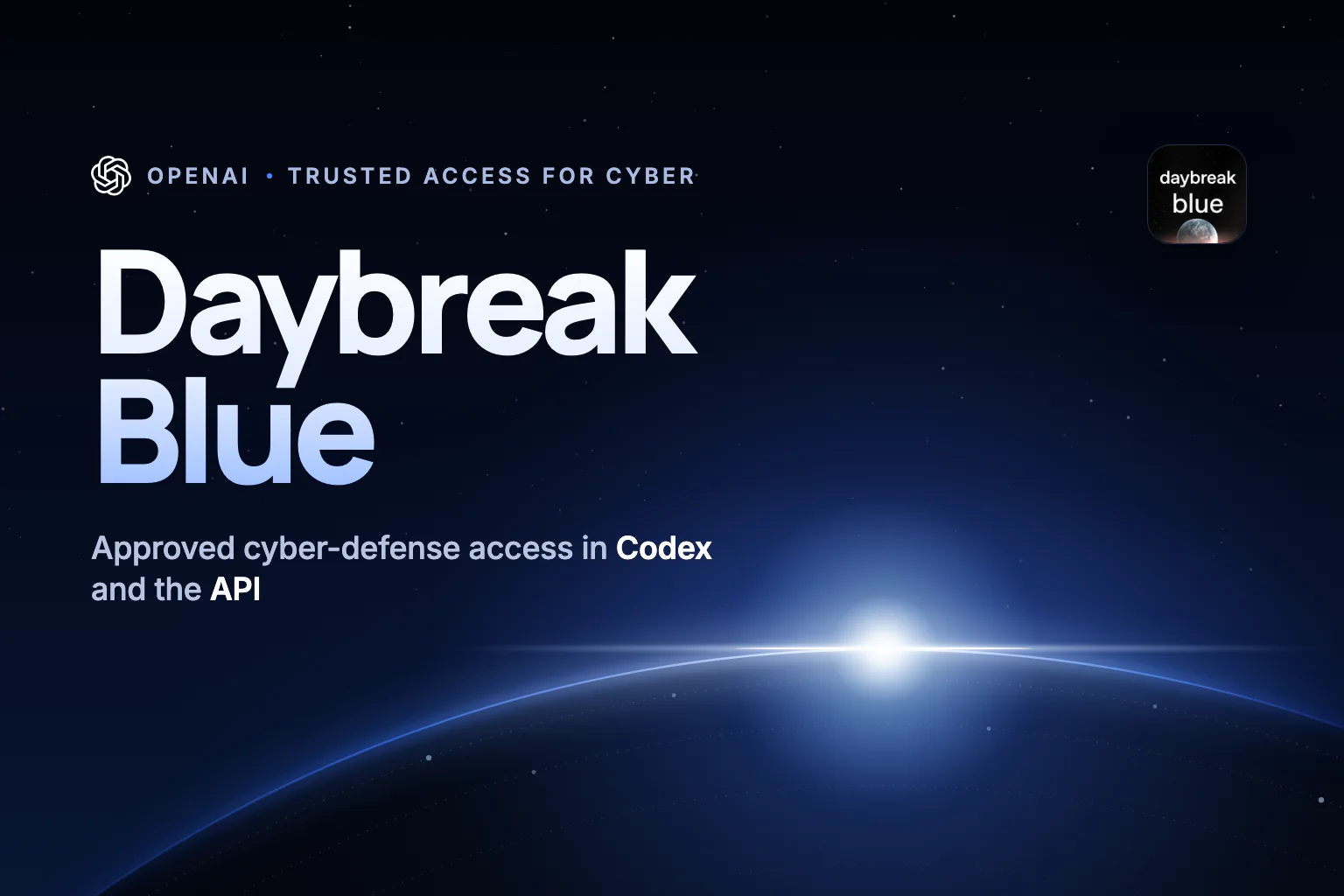
If “Daybreak Blue” just appeared in your Codex model picker, you are not looking at a secret new GPT. You are looking at a permission level—one that most people have not been granted yet.
Over the past few weeks, a new name has been showing up in OpenAI's coding tools: Daybreak Blue. Developers spotted it in the Codex app and command-line tool, then asked on Reddit and OpenAI's developer forum what it was. Some found that selecting it did nothing at all. One forum user who saw it in Codex on August 11 could not get a single message through; the request failed with a tokens-per-minute error.
The confusion is understandable. Daybreak Blue looks like a model, has a model-style API name, and sits next to GPT models in a picker. It is better understood as a door: an approval-gated access tier inside OpenAI Daybreak, the company's cyber-defense program, that lets verified defenders use OpenAI's flagship models with fewer cybersecurity refusals.
This guide explains what Daybreak Blue actually unlocks, which models sit behind it, how it differs from Daybreak Red, what it costs, and how a security team can evaluate it responsibly. It was researched and last checked on September 23, 2026, against OpenAI's API documentation, Codex changelog, help center and pricing pages, plus Amazon Web Services' launch materials.
The short answer
- Daybreak Blue is an access tier, not a new model. OpenAI's model page calls it “an alias for our flagship general-purpose models, with safeguards calibrated for defensive cybersecurity work.”
- The model behind it today is GPT-5.6 Sol. Since September 22, approved users can also get Daybreak Blue treatment on GPT-6 Sol and GPT-6 Luna.
- It reduces refusals for defensive work; it does not unlock offensive tooling. Exploit development and penetration testing belong to Daybreak Red, which requires a separate approval.
- You pay the underlying model's normal price. Through the alias, that is currently $4 per million input tokens and $20 per million output tokens.
- Access requires approval. Individuals apply with identity verification and hardware security keys. Organizations apply through an enterprise form, and an administrator must switch Daybreak on.
| Question | Answer as of September 23, 2026 |
|---|---|
| What is it? | An approval-gated tier of OpenAI Daybreak, officially OpenAI's Trusted Access for Cyber program |
| Model behind the alias | GPT-5.6 Sol; GPT-6 Sol and GPT-6 Luna are also supported |
| Where it works | Codex app and CLI, the Responses API, and Amazon Bedrock for eligible customers |
| Context and output | 1.05 million-token context window; up to 128,000 output tokens |
| Knowledge cutoff | February 16, 2026, inherited from GPT-5.6 Sol |
| Price | No surcharge: $4 input and $20 output per million tokens through the alias |
| Who can apply | Verified individuals and organizations doing authorized defensive work |
| What it is not | Not GPT-5.6-Cyber, not an unrestricted hacking model, and not a way to relax GPT-6 Astra's safeguards |
Why Daybreak Blue suddenly appeared in Codex
OpenAI introduced Daybreak Blue and Daybreak Red on August 10, 2026, in a public announcement and in the Codex changelog. The API changelog had listed the new model aliases three days earlier. The name began appearing in the Codex app and CLI almost immediately, and many people saw it long before they had any way to use it.
Seeing the name is not the same as having access. OpenAI approves Daybreak for a specific identity, ChatGPT workspace or API project, model and product surface. Even after approval, Daybreak is off by default. If you can see Daybreak Blue but cannot use it, OpenAI's troubleshooting guide points to a short list of causes:
- You, or your organization, have not been approved for Daybreak.
- You were approved, but a workspace owner has not enabled Daybreak for your account, or an API organization owner has not enabled it for the project behind your key.
- You are signed in to a different workspace, organization or API project from the one named in the approval. Default API projects are not eligible.
- You use Codex with a ChatGPT sign-in and the Daybreak toggle is off, so requests fall back to standard safeguards.
- Your Codex app or CLI is out of date.
OpenAI adds that access changes can take about 30 minutes to reach an API project, and that some Daybreak models do not appear in the API's model list even when access works. The reliable test is a direct request.
First, what is OpenAI Daybreak?
Daybreak is OpenAI's umbrella program for cyber defense. It launched in May 2026 around GPT-5.5, a cyber-tuned GPT-5.5 variant, and Codex Security, OpenAI's application-security agent. OpenAI now describes it as a governed cyber-defense stack: frontier models, the Codex agent harness, Codex Security, trusted workflows and partner companies.
The program exists because frontier models have become genuinely useful, and genuinely risky, for security work. OpenAI says GPT-5.6 Sol, released on July 9, delivers state-of-the-art cybersecurity performance. On ExploitBench, it scored 73.5% compared with 47.9% for GPT-5.5 at a comparable output-token budget, according to OpenAI. The same launch post says GPT-5.6 Sol's cyber safeguards block roughly ten times more potentially harmful activity than previous models.
That second figure explains why Daybreak Blue exists. Filters that stop attackers also stop defenders. A request to analyze malware, reproduce a bug or write a detection rule can look a lot like a request to cause harm. OpenAI states the trade-off plainly: “Overblocking therefore creates a security risk of its own.” Daybreak moves that line for people OpenAI has verified, rather than for everyone.
The wider program has other parts worth knowing. By June, OpenAI said, Codex Security had scanned more than 30 million commits across more than 30,000 codebases. On its Daybreak page, OpenAI reports 858 issues identified, 263 patches produced and 143 patches accepted upstream across 41 open-source codebases, in work that includes its Patch the Planet initiative with Trail of Bits. OpenAI has also committed $1 billion in subsidized Daybreak access over six months for frontline defenders.
Daybreak Blue vs. Daybreak Red vs. standard access
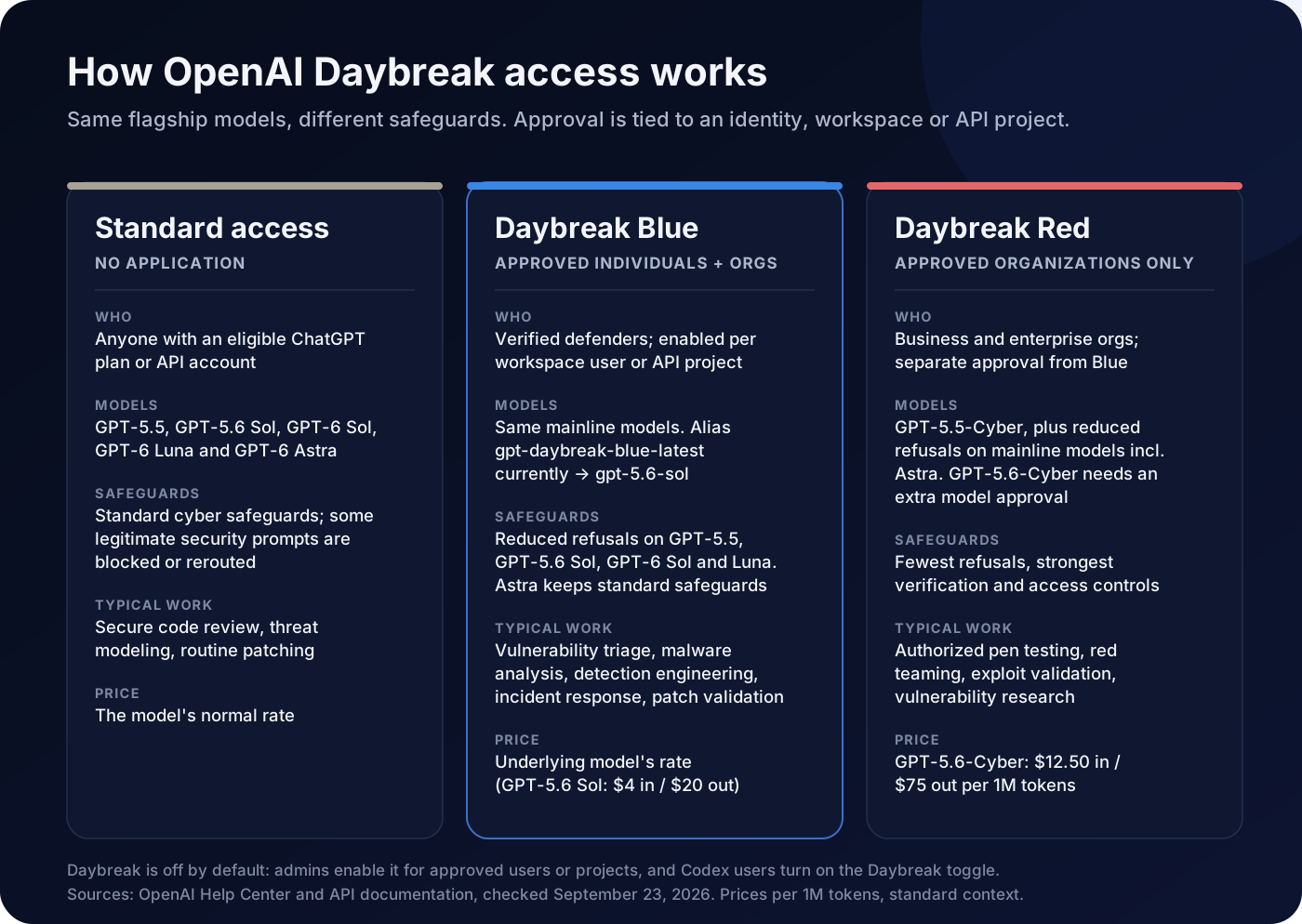
The names borrow from security jargon. A blue team defends systems; a red team attacks them, with permission, to find weaknesses first. OpenAI's tiers follow the same split.
| Standard access | Daybreak Blue | Daybreak Red | |
|---|---|---|---|
| Who | Anyone on a supported plan or API account | Approved individuals and organizations | Approved business and enterprise organizations only |
| Models | GPT-5.5, GPT-5.6 Sol, GPT-6 Sol, GPT-6 Luna and GPT-6 Astra | The same mainline models | GPT-5.5-Cyber plus the mainline models; GPT-5.6-Cyber with an extra approval |
| Safeguards | Standard | Fewer refusals on GPT-5.5, GPT-5.6 Sol, GPT-6 Sol and GPT-6 Luna; Astra stays standard | Fewer refusals on mainline models, including Astra, plus cyber-specialized models |
| Built for | Secure coding, threat modeling and routine patching | Vulnerability triage, secure code review, malware analysis, detection engineering, incident response and patch validation | Authorized penetration testing, red teaming, exploit validation and vulnerability research |
| Price | The model's list price | The underlying model's list price | GPT-5.6-Cyber: $12.50 input and $75 output per million tokens |
Two details are easy to miss in OpenAI's Trusted Access overview. First, Blue approval never includes Red. They are separate applications, and individuals cannot currently apply for Red directly. Second, even Red is not a single switch: GPT-5.6-Cyber, OpenAI's newest cyber-specialized model, needs an additional model-specific approval on top of Red.
What “reduced refusals” really means
OpenAI's safeguards work at two levels. System-level safeguards screen cyber-related requests and can block them, slow them down or send them to a less capable fallback model. Model-level refusals happen when the model receives the request and declines to help.
Daybreak Blue mainly changes the first layer. OpenAI says Blue access “removes those guardrails,” meaning the system-level screens, so approved defenders get more from the model during investigations, incident response, vulnerability management and security assessments. It does not retrain the model. GPT-5.6 Sol still refuses highly dual-use requests, such as pentesting production systems, even without the system-level filters.
OpenAI published a revealing internal test. Its Advanced Cybersecurity Completion Rate measures how often a model completes requests involving exploit-chain development, authentication bypass, privilege escalation and similar scenarios.
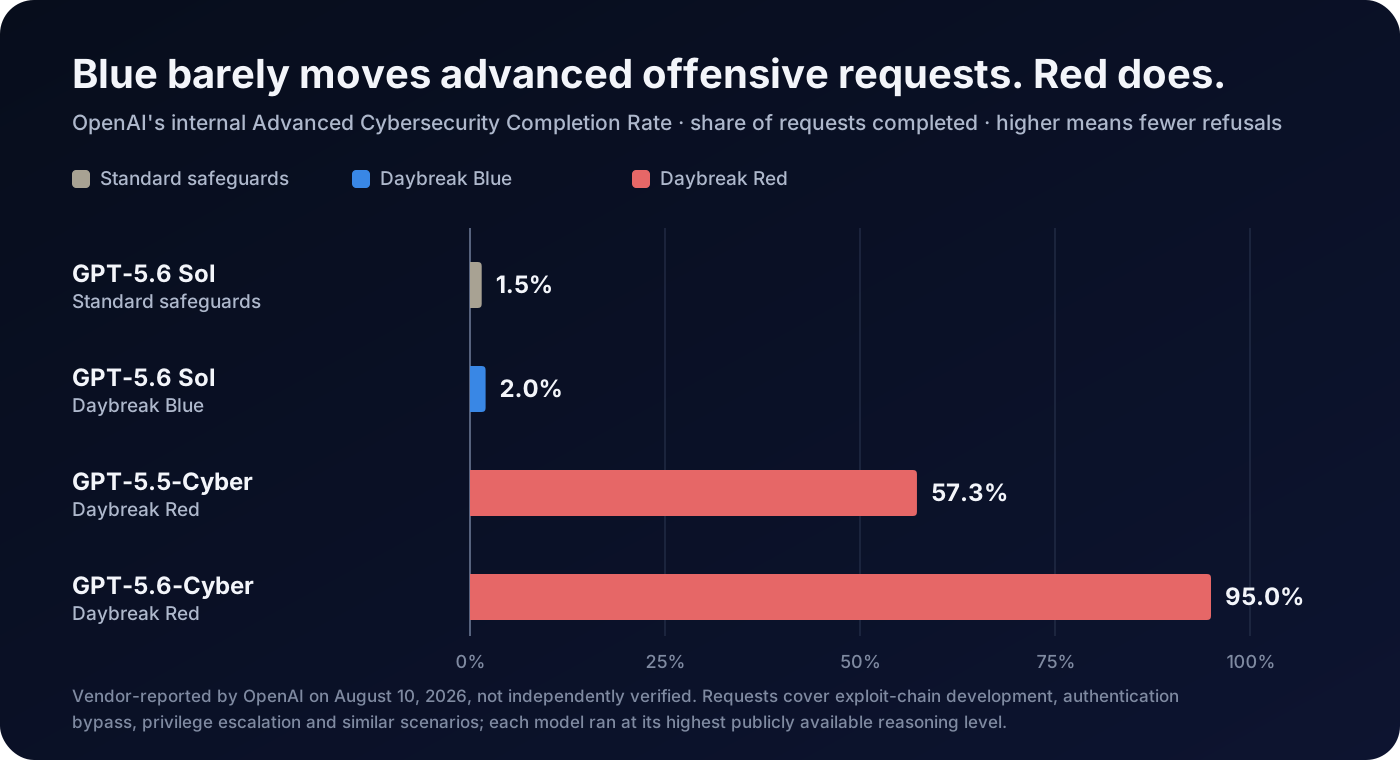
The chart is the clearest way to understand the tiers. Blue is for defenders whose legitimate work keeps tripping filters. If your job requires building working exploits against authorized targets, Blue will usually still say no; that is what Red is for. It also corrects a claim that spread after the launch: the widely shared figure of 95% completion on advanced cyber requests describes GPT-5.6-Cyber in Daybreak Red, not Daybreak Blue.
Blue is not simply the weaker option, either. On ExploitBench, OpenAI reports that GPT-5.6 Sol under Daybreak Blue was more token-efficient and performed best in the standard 300-turn setting; GPT-5.6-Cyber narrowed the gap only when runs were extended to 600 turns. On OpenAI's vulnerability discovery and report-writing evaluation, GPT-5.6-Cyber scored below GPT-5.6 Sol, which OpenAI attributes to shorter, less detailed reports. For many defensive jobs, such as finding issues and explaining them well, the general model behind Blue may be the better tool.
All of these results come from OpenAI's internal evaluations. The company says it will publish a system card for GPT-5.6-Cyber later, and independent testing of both tiers remains thin.
Which models work with Daybreak Blue now?
This is where the story changed this week. At launch, Daybreak Blue meant GPT-5.6 Sol. On September 22, OpenAI released GPT-6 Sol and GPT-6 Luna, and its help center now says both support reduced refusals under Daybreak Blue when the account is approved and Daybreak is enabled for the request.
| Model | Standard access | With Daybreak Blue |
|---|---|---|
| GPT-5.5 | Standard safeguards | Reduced refusals |
| GPT-5.6 Sol, the alias default | Standard safeguards | Reduced refusals |
| GPT-6 Sol | Standard safeguards | Reduced refusals |
| GPT-6 Luna | Standard safeguards | Reduced refusals |
| GPT-6 Astra | Standard safeguards | Standard safeguards; reduced refusals require Daybreak Red |
| GPT-5.5-Cyber and GPT-5.6-Cyber | No access | No access |
The Astra exception makes sense in context. OpenAI rates GPT-5.6 Sol as “High” for cybersecurity capability under its Preparedness Framework, but classified Astra as its first model at the “Critical” level. Our GPT-6 Astra guide covers that decision. OpenAI says it is working to bring reduced refusals on Astra to Blue customers; until then, approved Blue users can switch to GPT-6 Sol or GPT-6 Luna, or use Astra with standard safeguards.
One practical wrinkle: when we checked, the Daybreak Blue API alias still pointed to GPT-5.6 Sol, even though GPT-6 Sol is newer and cheaper. OpenAI says the aliases will move to newer models over time, with pricing adjusted to match. If you need to know which model answered, check the model field in each API response, or request a specific model instead of the alias.
How to get Daybreak Blue access
Individuals
Individual defenders apply at chatgpt.com/cyber. OpenAI's help center lists the requirements:
- You must be at least 18 and on an eligible paid ChatGPT plan.
- You must turn on Advanced Account Security and use compatible FIDO2 hardware security keys as your only sign-in method. Software and synced passkeys do not qualify.
- You must complete identity verification. A failed or denied verification cannot be retried or appealed unless OpenAI asks you to reapply.
Advanced Account Security changes how your account behaves. Password sign-in, email and SMS codes, and email-based recovery are disabled; sessions are shorter; and OpenAI says conversations are not used to train its models while the setting is on. Keep a backup key and your recovery keys somewhere safe, because losing every sign-in method and recovery key can mean losing the account.
Existing individual users must meet the account-security rules by October 1, 2026, to keep access. OpenAI has also acknowledged a verification error that removed access from some individual Blue accounts; affected users were asked to reapply.
Organizations
Organizations submit OpenAI's enterprise Trusted Access form and work with an OpenAI representative. Reviewers may ask about your organization and security capabilities, the defensive workflows you want to support and the workspace or API organization you plan to use. OpenAI says it weighs identity and trust verification, risk, the intended use and the applicant's ability to strengthen the wider security ecosystem.
Approval changes nothing on its own. A workspace owner turns Daybreak on for approved users and groups. In the API, an organization owner enables it for a named, non-default project under Project settings → General → Daybreak model access.
What Daybreak does not allow
- Serving customers. Daybreak is for internal, authorized work. It cannot power customer-facing products, downstream product traffic or third-party access; vendors are pointed to OpenAI's Daybreak partner program instead.
- Testing systems without permission. Use it only on systems you own or are explicitly authorized to assess.
- Assuming stronger privacy terms. Approval does not include Zero Data Retention. Any retention controls must be approved separately.
How to use Daybreak Blue in Codex
There are two paths, depending on how you sign in to Codex.
Signed in with ChatGPT. Use the approved workspace and turn on the Daybreak toggle before sending a request; with it off, requests use standard safeguards. Approved Blue users can then choose GPT-6 Sol or GPT-6 Luna with reduced refusals. You can confirm your status under Settings → General → Daybreak Access, and administrators control model availability from the ChatGPT admin console.
Signed in with an API key. There is no special Daybreak interface. Access follows the enabled API project, and you select the alias directly:
codex -m gpt-daybreak-blue-latestThe gpt- prefix is required. Recent Codex CLI releases added Daybreak-aware refusal notices and a per-thread Daybreak setting, so update before troubleshooting.
OpenAI pairs access with firm operating advice. It is “strongly encouraging” Daybreak customers to switch Codex from full-access mode to auto-review mode, which checks actions that need elevated permissions before they run and can block risky, destructive steps. Its recommended setup is simple:
- Isolate the work. Run security tasks in a sandbox without access to sensitive production systems or the open internet, and test the sandbox boundaries regularly.
- Define the scope. Write down which systems and actions are authorized, then enforce that with least-privilege permission profiles.
- Keep a human in the loop. Use auto-review for tool calls outside the sandbox, and add human oversight for higher-risk workflows.
OpenAI's Codex documentation gives a helpful example of where Blue stops. Reviewing an approved lab repository for authentication weaknesses, ranking the findings and proposing patches is Blue work. Reproducing that flaw and validating a proof of concept inside an approved test window is Red work.
For developers: Daybreak Blue in the Responses API
The Daybreak Blue alias works only through the Responses API, not Chat Completions, Batch or Realtime. Your project needs both program access and model access, and you must use that project's API key. OpenAI's Daybreak API guide shows two approaches.
You can request a specific model and select the Blue program explicitly. This example comes from OpenAI's guide:
curl https://api.openai.com/v1/responses \
  -H "Authorization: Bearer $OPENAI_API_KEY" \
  -H "Content-Type: application/json" \
  -d '{
    "model": "gpt-6-sol",
    "input": "Explain how to validate a security patch in a test environment.",
    "access_programs": {
      "cyber": "daybreak_blue"
    }
  }'
Or you can call the alias, which always uses the Blue program and follows whichever model OpenAI points it to:
{
  "model": "gpt-daybreak-blue-latest",
  "input": "Rank these scanner findings by exploitability and propose fixes."
}
A few rules trip people up:
- Match the program to the model, not to your approval level. With GPT-6 Sol, send
daybreak_blueeven if your organization also has Red; sendingdaybreak_redreturns an error. - Omitting the setting is not neutral. On mainline models, the API applies Blue treatment when your project has access and standard safeguards otherwise. Send
standardto opt out explicitly. - Astra is the odd one out. Reduced refusals on GPT-6 Astra require Red access, even though the request value for Astra is
daybreak_blue.
| Error | What it usually means |
|---|---|
400 invalid_access_program | The model needs a different program value; use the one named in the error. |
400 unsupported_access_program | The model does not support Daybreak; switch models or send standard. |
403 access_program_not_enabled | Your key's project lacks the program, or your organization lacks the approval. |
OpenAI publishes rate limits for the alias ranging from 500 requests and 500,000 tokens per minute at usage tier 1 to 15,000 requests and 40 million tokens per minute at tier 5. The alias accepts text and images, returns text, handles up to 922,000 input tokens and 128,000 output tokens, and can use hosted tools including web search, file search, code interpreter, computer use and MCP.
How much does Daybreak Blue cost?
There is no Daybreak surcharge. OpenAI's pricing page bills the Blue alias at the rates of the model behind it, which currently means GPT-5.6 Sol. OpenAI says GPT-5.6 Sol's promotional pricing will last at least through November 21, 2026.
| Per 1M tokens, standard processing | Input | Cached input | Cache writes | Output |
|---|---|---|---|---|
| Daybreak Blue alias, via GPT-5.6 Sol | $4.00 | $0.40 | $5.00 | $20.00 |
| Same alias, prompts above 272K input tokens | $8.00 | $0.80 | $10.00 | $30.00 |
| GPT-6 Sol standard rates | $2.00 | $0.20 | $2.50 | $10.00 |
| GPT-5.6-Cyber, Daybreak Red | $12.50 | $1.25 | $15.625 | $75.00 |
OpenAI does not list a separate Daybreak price for GPT-6 Sol, so Blue requests to that model should bill at its standard rates. A quick example shows why the choice matters. Suppose a secure code review sends 150,000 input tokens of code and receives 8,000 output tokens:
- Through the Daybreak Blue alias: $0.60 input + $0.16 output = $0.76
- GPT-6 Sol with Daybreak Blue: $0.30 + $0.08 = $0.38
- GPT-5.6-Cyber through Daybreak Red: $1.875 + $0.60 = about $2.48
Real agentic runs cost more than one request. Reasoning tokens bill as output, and an agent may read, test and retry many times. OpenAI also notes that GPT-5.6-Cyber tends to use more reasoning tokens than GPT-5.6 Sol. Treat the example as a comparison of rates, not a budget.
In Codex, usage is counted in credits. OpenAI's Codex pricing says Daybreak Blue uses GPT-5.6 Sol credit rates: 100 credits per million input tokens, 10 per million cached input tokens and 500 per million output tokens. Daybreak Red costs 312.5, 31.25 and 1,875 credits, while GPT-6 Sol costs 50, 5 and 250.
On Amazon Bedrock, the model appears as “Daybreak Blue: GPT-5.6 Sol” in US East (Ohio). It is billed through AWS, and OpenAI says Bedrock pricing in commercial regions matches its direct pricing for equivalent services. AWS says customers still need Trusted Access enrollment with OpenAI first.
For public-interest defenders, the subsidy may matter more than list prices. State and local governments, critical-infrastructure operators, community banks, nonprofits and open-source maintainers can register interest in OpenAI's $1 billion subsidized-access program.
When Daybreak Blue is the right tool, and when it isn't
The simplest test is this: if standard models already handle your security work without refusing, you do not need Daybreak Blue. It solves one specific problem, which is legitimate defensive requests being blocked or rerouted.
| Task | Best fit | Why |
|---|---|---|
| Secure code review of your own repository | Standard, or Blue if reviews keep getting blocked | Routine review usually works with standard safeguards. |
| Triage of scanner findings and CVEs | Daybreak Blue | It needs detailed reasoning about how a flaw could be abused. |
| Malware analysis in a lab | Daybreak Blue | It is an explicit Blue use case; keep it in an isolated environment. |
| Detection rules and incident response | Daybreak Blue | Attacker-technique detail is part of the job. |
| Checking that a patch closes a hole | Daybreak Blue | OpenAI lists patch validation as a core Blue workflow. |
| Building a proof-of-concept exploit | Daybreak Red | Blue will usually refuse; Red exists for this work. |
| Authorized penetration test or red-team exercise | Daybreak Red | Offensive testing requires the separate approval. |
| A security product sold to customers | Neither; talk to OpenAI's partner program | Daybreak cannot power customer-facing traffic. |
Blue is also a poor fit for teams that cannot meet the operating requirements: hardware keys for individual users, a dedicated non-default API project, sandboxing and logging. The same is true for teams that need contractual data controls such as Zero Data Retention from day one, because those must be arranged separately.
How Daybreak compares with Anthropic's Project Glasswing
OpenAI is not the only lab rationing cyber capability. Anthropic's Project Glasswing, announced on April 7, 2026, gives selected organizations access to Claude Mythos Preview, an unreleased frontier model. Anthropic introduced it by warning that AI models can now surpass all but the most skilled humans at finding and exploiting software vulnerabilities. Glasswing began with roughly 50 partners and, on June 2, expanded to about 150 more organizations in more than 15 countries, many of them critical-infrastructure operators. Anthropic says its early partners found more than 10,000 high- or critical-severity flaws.
| OpenAI Daybreak | Anthropic Project Glasswing | |
|---|---|---|
| What you get | Flagship GPT models with fewer refusals (Blue); cyber-specialized models (Red) | Claude Mythos Preview |
| Who can get it | Approved individuals for Blue; approved organizations for Blue and Red | Selected organizations that meet Anthropic's security requirements |
| How to apply | Public application routes for individuals and organizations, subject to review | Partner selection; Anthropic has mentioned a Cyber Verification Program for specific defensive tasks |
| Published pricing | The underlying model's list price, plus $1 billion in subsidized access for frontline defenders | $25 input and $125 output per million tokens for participants after the research preview, plus up to $100 million in usage credits |
The philosophies differ. Glasswing concentrates an exceptionally capable model among a smaller group of institutions. Daybreak Blue makes a more modest capability shift available to a much wider group, including individual researchers, while holding the most permissive models back for approved organizations in Red. In both cases, the headline results are reported by the companies themselves.
A two-week pilot plan for security teams
If you are considering an application, the useful question is not whether Daybreak Blue is powerful. It is whether it removes friction from work you are already authorized to do, without creating new risk. A short, disciplined pilot answers that.
- Collect the refusals you already have. Before applying, log the defensive requests that standard models blocked, rerouted or refused over a few weeks. If the list is short, you may not need Blue.
- Build a replay set from closed work. Choose 20 to 30 tasks with known answers: fixed vulnerabilities, resolved incidents, retired detections and patched pull requests. Known outcomes let you score accuracy instead of guessing.
- Run the same set twice. Use one model, such as GPT-6 Sol, first with standard safeguards and then with Daybreak Blue. Changing the model and the safeguards at the same time hides what Blue itself changed.
- Measure what matters. Track completion without refusal, correct findings, false positives, patch correctness, analyst time saved and cost per task.
- Keep the guardrails on during the pilot. Use an isolated sandbox, auto-review, least-privilege permissions and no production credentials. Have a person confirm every finding before it becomes a ticket.
- Decide with evidence. Keep Blue if it clears real blockers with acceptable accuracy. Consider Red only if the remaining blockers are exploit validation or authorized offensive testing, and only if your organization can meet Red's stricter controls.
Caveats worth keeping in mind
- Most of the evidence is OpenAI's. The completion-rate, ExploitBench and vulnerability-discovery results come from OpenAI's internal evaluations. They are useful signals, not independent benchmarks.
- Aliases move. The Daybreak Blue alias will change as OpenAI releases new Daybreak models, and prices will change with it. Name a specific model when reproducibility matters.
- Access rules are still settling. Individual users face a new account-security deadline, and OpenAI has already reversed some approvals after a verification error.
- Reduced safeguards carry real risk. OpenAI itself says models running with reduced safeguards “carry risks beyond standard model usage, whether from misuse or misalignment.” Sandboxing and review are not optional extras.
- Not everyone is convinced. In its launch coverage, TechCrunch noted that critics see rising AI-driven cyber threats as a marketing opportunity for the labs, even as enterprises look to those same labs for protection.
The bottom line
Daybreak Blue is best understood as a permission layer, not a new brain. It gives verified defenders access to OpenAI's flagship models, GPT-5.6 Sol by default and now GPT-6 Sol and Luna, with fewer of the cyber filters that frustrate legitimate security work. It does not turn those models into exploit generators, and it does not cost extra.
For most developers who spotted it in Codex, the practical answer is simple: you can ignore it unless you do defensive security work and your requests are being blocked. For security teams that fit that description, it is worth applying, then proving its value with a small, measured pilot before it touches anything important.
You can compare the specifications in our model library: Daybreak Blue, GPT-5.6 Sol and GPT-6 Sol. Or see them side by side in Daybreak Blue vs. GPT-5.6 Sol, GPT-6 Sol vs. Daybreak Blue and Daybreak Blue vs. GPT-6 Astra.
Frequently asked questions
Is Daybreak Blue a new OpenAI model?
No. It is an access tier in OpenAI's Daybreak program. The API alias currently points to GPT-5.6 Sol, and approved users can also get Blue treatment on GPT-6 Sol and GPT-6 Luna.
Why can I see Daybreak Blue in Codex but not use it?
Seeing it in the picker does not mean you are approved. You need Daybreak approval for your account or organization, an administrator must enable it, and in Codex with a ChatGPT sign-in you must turn on the Daybreak toggle.
What is the difference between Daybreak Blue and Daybreak Red?
Blue reduces refusals on mainline models for defensive work such as triage, malware analysis and incident response. Red adds cyber-specialized models such as GPT-5.5-Cyber and GPT-5.6-Cyber for authorized offensive testing, and it is available only to approved organizations.
Is Daybreak Blue the same as GPT-5.6-Cyber?
No. GPT-5.6-Cyber is a separately trained model available only through Daybreak Red with an additional model approval. Daybreak Blue uses general-purpose models.
How much does Daybreak Blue cost?
There is no Daybreak surcharge. Through the alias, it is billed at GPT-5.6 Sol's rates: $4 per million input tokens and $20 per million output tokens, with higher rates above 272,000 input tokens. In Codex, it uses GPT-5.6 Sol credit rates.
Does Daybreak Blue work with GPT-6 Astra?
You can use Astra with Blue access, but it keeps standard safeguards. Reduced refusals on Astra currently require Daybreak Red.
How do I get access to Daybreak Blue?
Individuals apply at chatgpt.com/cyber and need an eligible paid plan, Advanced Account Security with hardware security keys, and identity verification. Organizations apply through OpenAI's enterprise Trusted Access form.
Is Daybreak Blue available on Amazon Bedrock?
Yes, for eligible customers in US East (Ohio) who have completed Trusted Access enrollment with OpenAI. It is billed through AWS.
Does Daybreak Blue include Zero Data Retention?
No. Trusted Access does not automatically grant Zero Data Retention. Any retention controls must be approved separately for the specific API organization and endpoint.
How we researched this
On September 23, 2026, we checked OpenAI's Daybreak Blue model page, API pricing and changelog, the Responses API Daybreak guide, the Codex changelog, pricing and cyber-safety documentation, and OpenAI Help Center articles on Trusted Access for Cyber, troubleshooting and Advanced Account Security. We also reviewed OpenAI's August 10 announcement, the GPT-5.6 launch post, AWS's Bedrock materials, TechCrunch's launch coverage and Anthropic's Project Glasswing pages. Benchmark figures are vendor-reported, and we did not test Daybreak Blue ourselves. Prices, aliases, eligibility rules and model support can change after publication.