

- AI Tools
- Artificial Intelligence
Grok Bot vs OpenAI Dots: Which AI Agent Fits Your Work?
Grok Bot gives you a roster of AI teammates. OpenAI Dots gives you one agent that coordinates ongoing work. Here is how their cloud computers, routines, approvals, and costs compare.
The interesting part of an AI agent is what happens after you stop talking to it. Does it remember the project? Notice the next deadline? Bring back a useful draft instead of another list of things you should do yourself?
That is the promise behind Grok Bot and OpenAI Dots. Both move beyond a chatbot that answers the latest prompt. They offer agents with cloud computers that can keep working between conversations. But they organize that work differently, and the difference matters more than their animated personalities.
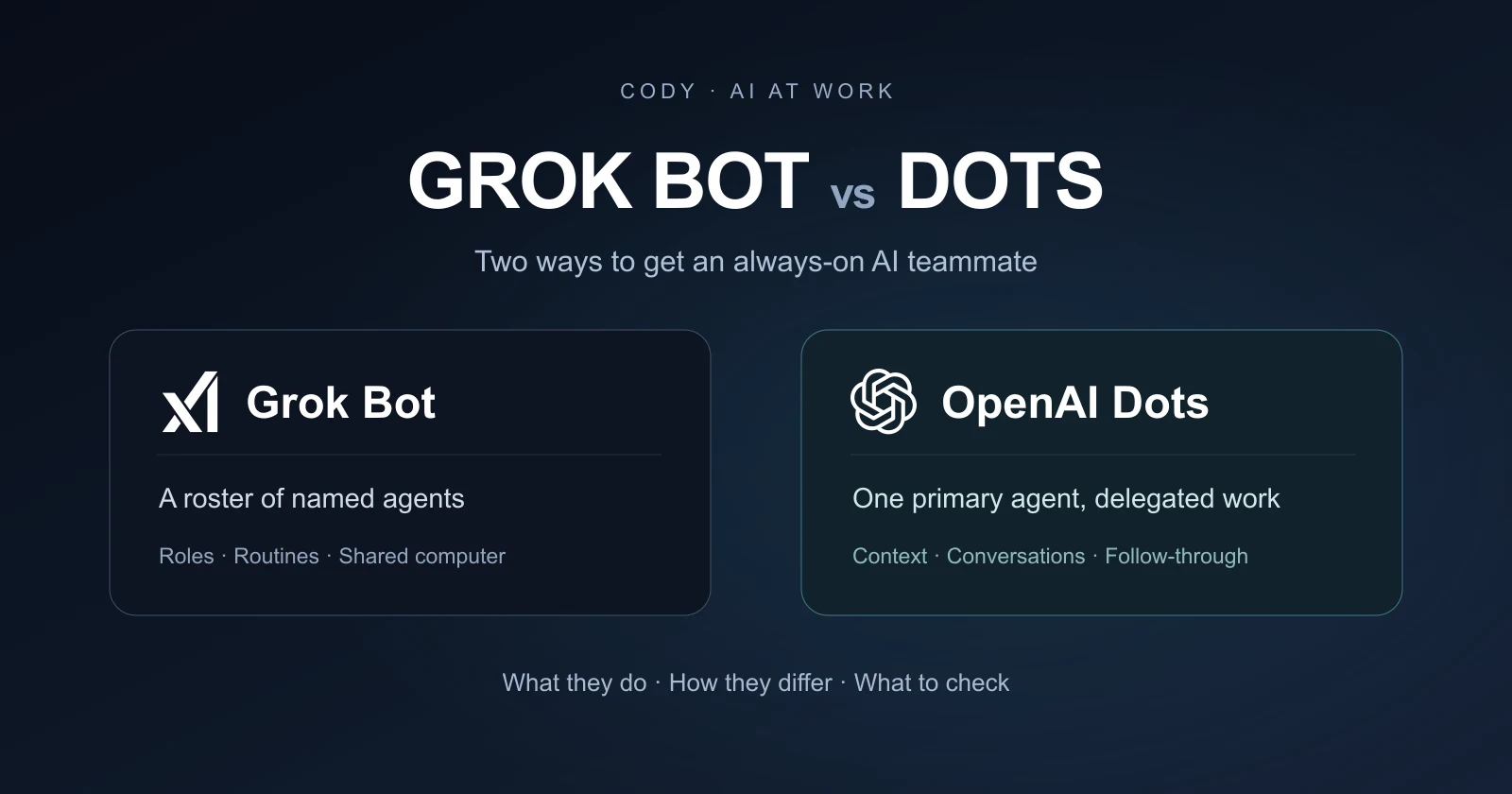
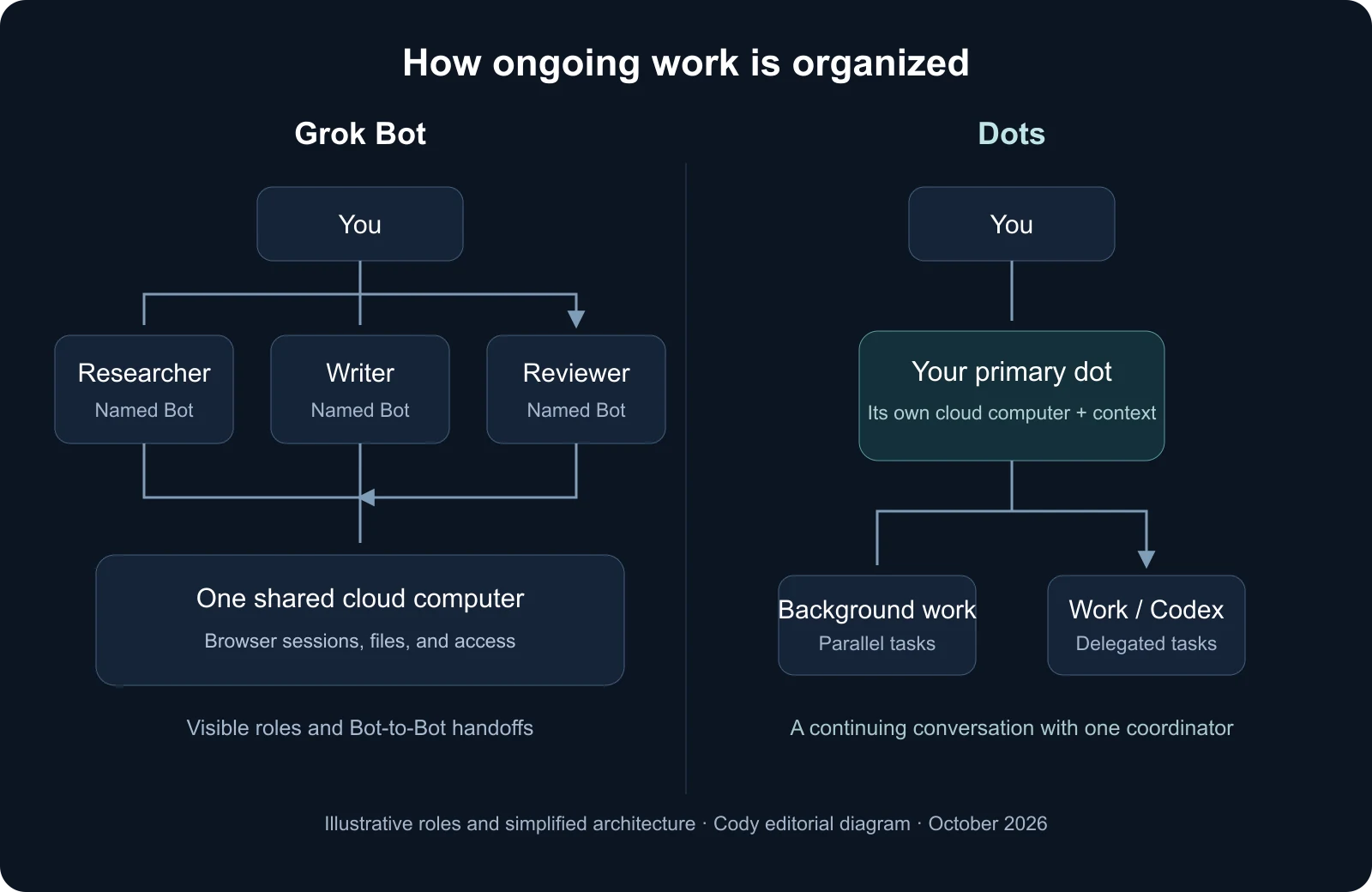
Grok Bot gives you a roster of named teammates. Dots starts with a primary agent that keeps track of your responsibilities and delegates individual jobs. One approach makes the team visible; the other gives you a continuing point of contact.
Our view: Grok Bot is worth examining when you want distinct owners for recurring jobs. Dots is worth examining when you want one agent to connect the dots across your work. Neither is a reason to hand over broad access before checking what the agent can actually deliver.
Grok Bot vs Dots: the short answer
This is a comparison of agent products, not a Grok-versus-GPT model benchmark. The question is how you prefer to delegate, supervise, and continue work.
| What matters | Grok Bot | OpenAI Dots |
|---|---|---|
| Working relationship | Several named Bots with distinct roles and visible handoffs. | A primary dot coordinating responsibilities and delegated tasks. |
| Practical attraction | A small operational team you can organize around repeatable jobs. | One continuing conversation across projects and contact methods. |
| Automation | Skills describe the method; routines specify a schedule or supported event. | Ongoing follow-through, background work, and scheduled or supported event-based tasks. |
| What to inspect | Shared computer access, ownership between Bots, and metered usage. | Context carried into delegated work, approval boundaries, and task usage. |
The strongest buying signal is a responsibility you already understand. If you cannot explain what a successful result looks like, adding an always-on agent usually makes the ambiguity run faster.
What is Grok Bot?
xAI introduced Grok Bot on August 11, 2026 as a team of always-on agents. The product works across applications and websites, including tools without a convenient API. It is distinct from asking the ordinary Grok chatbot a question.
The current Grok Bot documentation describes Bots as durable teammates with their own names, conversations, roles, and working context. You can put them in group chats and let them pass work between one another. Cursor supplies the documented runtime and account controls.
Imagine a research Bot that gathers customer feedback, a writing Bot that prepares a brief, and a review Bot that checks the claims. The attraction is not the number of characters in the sidebar. It is being able to give each stage an owner and see the handoff.
Our take is that this can make a recurring operation easier to reason about. A well-defined Bot has a clear job, source material, and finish line. A vague “general assistant” multiplied five times may simply give you five conversations to manage.
Routines make the responsibility repeatable
Grok Bot's routines guide distinguishes a schedule from an event trigger. A Bot can run work at a set time or respond to supported events such as a Slack message, an email, or a webhook. The work runs in the cloud while your laptop is closed.
A useful example would be preparing a customer-risk summary when a particular support escalation arrives. A less useful version would wake the Bot for every message in a busy channel. The first has an operational purpose; the second can create noise and spend usage without improving the day.
Teaching by demonstration is also part of the product. The work guide describes a gradually rolling-out “Teach a task” feature that records a browser workflow and turns it into a draft skill. A demonstration captures steps; it still needs rules for missing data, exceptions, and approvals before becoming a dependable routine.
What are OpenAI Dots?
OpenAI describes a dot as an always-on agent powered by GPT-6 Astra, with its own cloud computer and browser. It can research, analyze information, prepare documents, and build software while maintaining context about your ongoing work.
The practical difference is the relationship. You return to your primary dot with new information rather than deciding which specialist to message first. It can keep track of several responsibilities and coordinate the work needed to move them forward.
This does not mean Dots is limited to one task at a time. Its task documentation describes parallel background agents, separate work threads, and delegation to ChatGPT Work or Codex. The dot remains the coordinator you talk to while those jobs run.
That could be a good fit for work that changes shape throughout the week: a proposal becomes a spreadsheet task, a customer question becomes a code investigation, or a planning discussion creates a deadline. Our read is that Dots is trying to reduce the effort of keeping those threads connected.
The latest Dots update changes the onboarding story
Some early comparisons still say you must create your dot on desktop. OpenAI's October 5–9 update says you can now create and personalize it in the ChatGPT mobile app and connect plugins from your phone. The update also improves how a dot starts and follows up on Codex work.
For an eligible account, that makes the first experience less dependent on sitting at a desk. It does not turn phone setup into unrestricted access to your laptop: connecting your own computer remains a separate decision.
The mobile setup flow is straightforward: open Dots in the current ChatGPT app, give your dot a name and appearance, and connect the plugins it needs. You can skip connections and add them later.
Watch OpenAI's mobile setup demonstration.
Can they work while your computer is off?
For work on their cloud computers, yes. But “always on” describes availability and continuity, not a guarantee that every task will run uninterrupted. A login can expire, a website can block an agent, or a necessary decision can require you.
The distinction between cloud and local work is important. The Dots computer guide says its own browser sessions are separate from yours. Optional access to your computer requires that device to remain online with the ChatGPT app open. A cloud job and a job using local files do not have the same availability.
Grok Bot's computer documentation likewise describes persistent cloud files and logins, with conversation history stored separately. Durable state helps an agent resume a project; it does not make backups, session management, or recovery irrelevant.
Our advice is to ask where a task will run before making it recurring. A nightly report that quietly depends on an offline laptop is not the same thing as a cloud workflow you can leave alone.
Grok Bot's shared computer is an important difference
The current Grok Bot architecture guide says each user receives a dedicated cloud computer, but every Bot belonging to that user shares it. The work guide adds that files, browser sessions, and command-line credentials are shared; separate Bot screens are not security boundaries.
That can make collaboration convenient. One Bot can pick up an artifact another has saved. But naming one Bot “Finance” and another “Marketing” does not create a permission wall between them. Readers should not confuse a useful organizational metaphor with isolated accounts.
With Dots, the primary agent has its own cloud computer, and connected-app access follows the permissions you grant. It is not a blanket separation between everything you have connected either. Both products need an intentional access plan.
For a small project, shared context may be exactly what you want. For sensitive work across clients or departments, the question is what the platform actually isolates—not whether an agent has a different name or avatar.
Messages, memory, and knowing when to interrupt
Dots' messaging guide documents ChatGPT, voice calls, Slack, and Teams as contact methods for the same dot. Conversations remain distinct, while relevant context can carry between them. Texting is currently listed as coming soon, so we would not assume SMS access from launch-era descriptions.
Grok Bot's mobile guide now lists iOS and Android, with the same account and cloud computer as desktop. Its role-based conversations give you a more explicit choice of which Bot to steer.
Neither approach solves attention management automatically. The important instruction is what deserves an interruption. A changed customer deadline may need a message; another successful routine check probably does not.
We would judge memory by whether it improves decisions, not by how much an agent seems to remember. Ask it to reopen the current source when a number matters. An old preference is useful context; an old price list is a problem. The distinction between remembering and retrieving current evidence is central to enterprise RAG and context engineering.
How approvals work—and what “proactive” does not mean
Both products document an automatic review layer for consequential actions. Grok Bot's security guide describes Auto Review as an independent model that can allow an action, request approval, or deny it. Users can add narrow rules; Enterprise administrators can enforce review and team rules.
OpenAI's Dots controls guide describes instructions, app permissions, optional custom rules, and built-in safeguards. Importantly, proactive research is read-only: it cannot itself send messages, change app content, or control a computer. Follow-up actions have their own permission requirements.
This is a more useful definition of proactivity than “it acts whenever it wants.” An agent can notice a problem and prepare a response without automatically publishing, paying, or contacting someone. Preparation and execution should be separate when the cost of a mistake is high.
We would begin with drafts and evidence-backed recommendations. Broader permission should follow a repeated, reviewable result—not a persuasive demonstration. Automatic review is a safeguard, not proof that the agent cannot make a mistake.
What do Grok Bot and Dots cost?
Dots access is rolling out to eligible Pro, Business Premium, and Enterprise accounts. Individual Pro access excludes the EEA, UK, and Switzerland and requires users to be over 18. Business Premium and Enterprise roll out worldwide; Enterprise requires administrator enablement. Eligibility does not guarantee immediate availability.
OpenAI's current pricing documentation lists Pro tiers at $100, $200, and $500 a month. The Dots usage guidance excludes its conversations from ChatGPT usage limits, but Work and Codex tasks use those products' allowances. The deeper-work allowance also has launch-period conditions; “included” should not be read as unlimited execution.
The current Grok Bot billing guide says access is included with qualifying paid Cursor plans, linked SuperGrok or X Premium+ subscriptions, and eligible Grok Business seats. You do not need a separate Grok Bot subscription. Included weekly usage can be followed by paid on-demand usage through Cursor if enabled. Linking two eligible subscriptions does not stack their grants.
For an existing paid user, included access is a good reason to run a small trial before buying another product. For a new buyer, compare the whole subscription and the actual jobs you expect it to handle. A lower entry price is not enough if the output takes longer to correct.
Watch recurring work especially closely. A frequent trigger can spend a week's allowance surprisingly quickly. Start with one narrow job, inspect the usage after it completes, and set a deliberate spending limit before letting it repeat.
Which would we choose for real work?
Consider a weekly launch review for a small software business. Product changes arrive in one place, customer feedback in another, and marketing needs a current brief.
We would evaluate Grok Bot first if the workflow naturally divides into durable roles: one teammate gathering feedback, another maintaining the launch draft, and another checking it against approved product details. The question would be whether the handoffs remain understandable as the project changes. More Bots should reduce your coordination work, not increase it.
We would evaluate Dots first if the same person keeps reconnecting those responsibilities throughout the week. A primary agent could keep the launch context together, bring the next decision to that person, and delegate a document or coding task when needed. The question would be whether it passes the right context to the task and brings back a useful, inspectable result.
This is our assessment of the documented product designs, not a head-to-head test result. A credible trial would give both products the same approved sources, prohibit publishing or customer contact, and ask for a brief with linked evidence and unresolved questions.
Then change one fact—a date, a feature, or an audience—and see what happens. Does the agent revise the existing work, explain the impact, and preserve the approval boundary? That second interaction tells you more about the agentic experience than the first polished answer.
We would also check the boring parts: whether the result is in the right tool, whether its sources are current, how an interrupted job resumes, and how you stop future runs. A dependable teammate is useful because it closes loops, not because it looks busy.
How do they fit alongside Codex, Claude Code, and Copilot?
These products do not make focused coding tools obsolete. Dots can coordinate work in Codex, and Grok Bot can delegate coding to Cursor Cloud Agents. An ongoing coordinator and the environment that performs a specific job can complement one another.
The broader race is about where you want work to live. Microsoft's and Google's workspaces emphasize their existing business ecosystems; Grok Bot emphasizes a visible roster; Dots emphasizes a continuing relationship. Our Copilot vs Gemini desktop comparison covers that adjacent question.
For underlying capabilities, use the AI model library as a separate reference. Cursor's model guidance says Grok Bot manages selection without a customer-facing picker and can use xAI or third-party models. Do not assume its brand name identifies one fixed model. Model choice matters, but it cannot explain shared browser state, task ownership, approval handling, or the way an agent follows up. Those are product decisions.
Frequently asked questions
What is the main difference between Grok Bot and OpenAI Dots?
Grok Bot organizes work around named Bots that can collaborate. Dots starts with a primary agent that coordinates ongoing responsibilities and delegates tasks. Both support cloud work between conversations.
Is Grok Bot the same as the Grok chatbot?
No. Grok Bot is an agent product with persistent work, computer access, roles, and routines. The ordinary Grok chat experience is a different product.
Can Dots work on more than one task at a time?
Yes. OpenAI documents parallel background work and delegated tasks. One primary dot does not mean only one active job.
Does each Grok Bot get a separate computer?
No. Bots belonging to one user share that user's cloud computer, including files and browser sessions. Separate roles and screens are not permission isolation.
Can I create a dot on my phone?
Yes, for eligible accounts using the current ChatGPT mobile app. OpenAI added mobile creation in its October 5–9, 2026 update. Mobile web is not supported.
Are Grok Bot and Dots free?
Ongoing access depends on an eligible paid plan. Grok Bot documents a limited trial credit; Dots access depends on eligible OpenAI plans and rollout. Included access does not mean unlimited task usage.
The takeaway: choose the working relationship, then test the work
Grok Bot and Dots make the same broad promise: less restarting, more follow-through. Grok Bot makes that relationship look like a team. Dots makes it look like one agent that stays with you as the work changes.
Our preference would follow the responsibility. Choose a visible roster when separate roles clarify ownership. Choose a primary coordinator when continuity is the harder problem. Then let current evidence, completed work, and the effort of review determine whether the promise holds up.
Sources and editorial approach
Reviewed October 12, 2026, using official xAI announcements, Cursor's current Grok Bot documentation, and official OpenAI documentation. Product details are linked near the claims they support. The diagrams are original Cody illustrations; the video is OpenAI's official onboarding demonstration.
We did not run a controlled head-to-head benchmark or independently reproduce the vendors' launch demonstrations. Recommendations are our editorial interpretation of the documented workflows. Access, usage, and preview features can change; confirm them in your account before purchasing or delegating consequential work.