

- AI Knowledge Base
- AI Tools
- Artificial Intelligence
What Is Docling? A Practical Guide to Document Parsing for RAG
Docling turns PDFs, Office files, images, email, and more into structured data for AI. Learn how it works, where it fits in RAG, and how it compares with other document parsers.
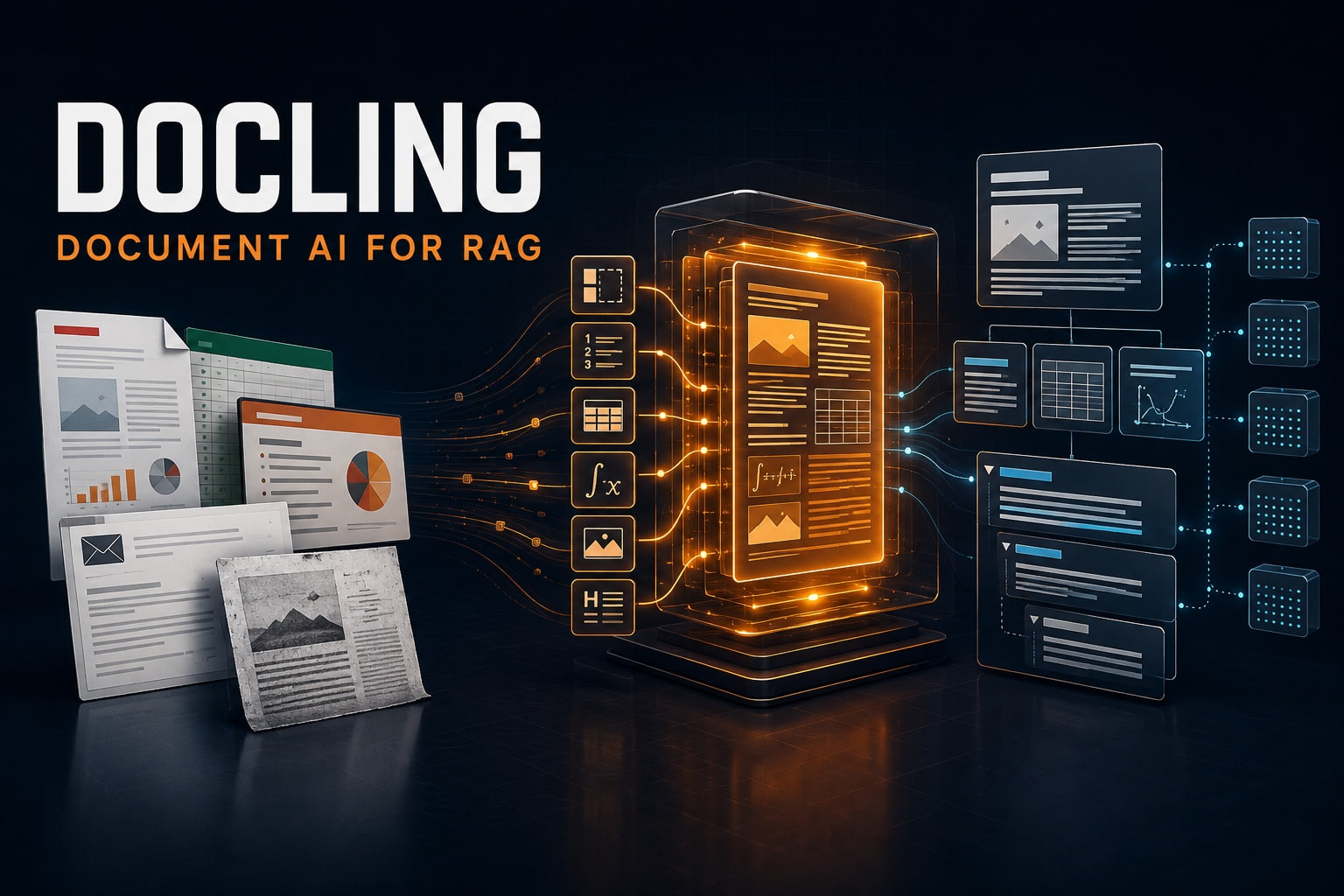
Docling can turn a messy file into structured, traceable content before your AI ever sees it. Here is what that means in practice—and when another parser may be the better choice.
When a RAG assistant gives the wrong answer, the language model is an easy target. But many failures happen earlier. A PDF was read in the wrong order. A table became a jumble of numbers. A footer was mixed into the body. By the time the information reaches the model, the meaning has already been damaged.
Docling is built for that first, easily overlooked stage. It converts documents into a structured representation that an application can export, inspect, chunk, embed, and retrieve. It is local-first, open source, and flexible enough to handle everything from a clean Word file to a scanned annual report.
This guide explains Docling in plain English, shows how it fits into a RAG pipeline, and compares it with Unstructured, LlamaParse, Marker, and PyMuPDF4LLM. The goal is not to declare one universal winner. It is to help you choose the right ingestion layer for the documents you actually have.
September 4, 2026 update
Docling v2.126.0 was released on September 4, 2026. Its headline addition is a native PDF pipeline: a faster path that reads a PDF’s own text and images without running the layout, OCR, or table models. That gives teams a useful choice—use native extraction for straightforward born-digital PDFs, and the fuller AI pipeline when document structure matters.
What is Docling?
Docling is an open-source document conversion toolkit created by researchers at IBM and now hosted as a project of the LF AI & Data Foundation. It is available as a Python library, command-line tool, self-hosted API server, and integrations for popular AI frameworks.
Its job is to take files that were designed for people—PDFs, Word documents, presentations, spreadsheets, images, email, web pages, and more—and turn them into data that software can understand. The official Docling documentation describes advanced PDF support for page layout, reading order, tables, code, formulas, pictures, and OCR.
Docling is not a vector database, an embedding model, or a complete RAG application. It prepares the source material for those systems. Think of it as the bridge between “we have 20,000 business files” and “our AI can reliably search what is inside them.”
| Question | Short answer |
|---|---|
| Who started Docling? | IBM Research’s AI for knowledge team |
| Is it open source? | Yes. The core code is MIT-licensed; check the licenses of optional models you deploy. |
| Can it run locally? | Yes, including offline and air-gapped environments after model artifacts are prefetched. |
| What does it produce? | A structured DoclingDocument, with exports such as Markdown, HTML, text, DocTags, and lossless JSON. |
| What is it best for? | Document ingestion, AI search, RAG, extraction workflows, and agents that need grounded document context. |
Why Docling is more than a PDF-to-Markdown tool
The easiest way to understand Docling is to compare two possible outputs from the same page.
A basic text extractor might return every visible word as one long string. That can work for a simple memo. It works much less well for a two-column research paper, a financial statement with merged headers, or a form where the position of a value tells you what the value means.
Docling first builds a DoclingDocument. This unified document model can represent:
- text, tables, pictures, and key-value items;
- sections, groups, and the document hierarchy;
- the intended reading order;
- headers and footers separately from the main body;
- page locations and bounding boxes when available;
- provenance that connects an extracted element to its source.
That distinction matters. Markdown is one useful view of a document; it is not the document model itself. An application can keep the richer representation for citations and validation, then produce the particular output each downstream step needs.
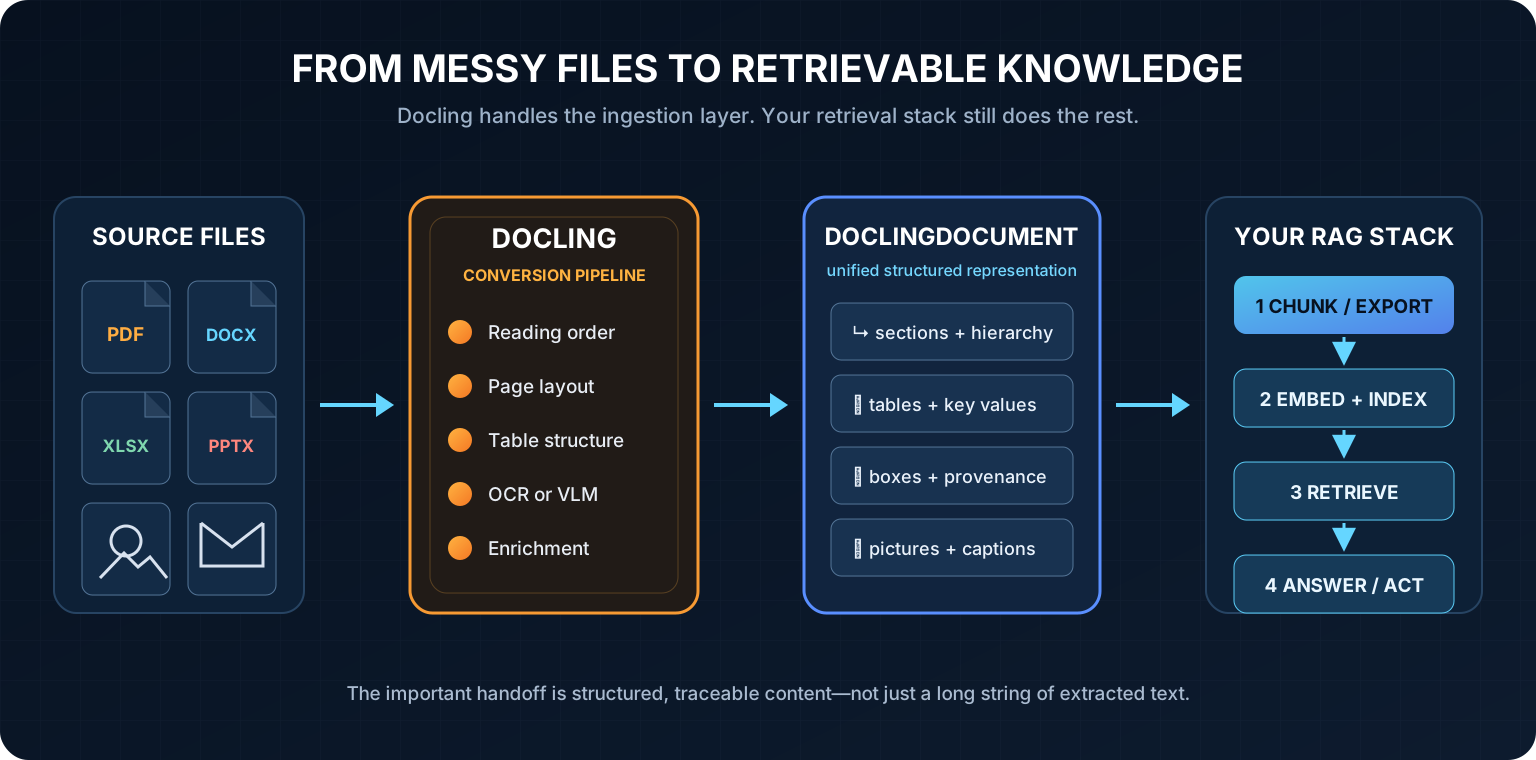
How Docling works, without the jargon
- You give it a file or URL. The
DocumentConverteridentifies the format and selects an appropriate backend and processing pipeline. - It reads both content and structure. Depending on the file and configuration, Docling can use native text, layout analysis, table recognition, OCR, or a vision-language model.
- It builds a DoclingDocument. Text is organized alongside tables, pictures, hierarchy, page geometry, and source information.
- You choose what happens next. Export to Markdown or HTML, serialize to JSON, create RAG chunks, send the result to another framework, or expose conversion through an API.
This modular design is one of Docling’s strongest ideas. A clean digital PDF does not always need the same expensive visual processing as a faded scan. A research paper may need formulas and reading order, while an invoice workflow may care more about tables and key-value pairs.
What file formats does Docling support?
The current supported-formats reference covers a surprisingly broad mix:
- Documents: PDF, DOCX, legacy Word files, OpenDocument text, Markdown, AsciiDoc, LaTeX, HTML, and EPUB;
- Spreadsheets and presentations: XLSX, PPTX, older Microsoft Office formats, ODS, ODP, CSV, and Apple Pages;
- Visual media: PNG, JPEG, TIFF, BMP, and WebP;
- Communication and media: EML, MSG, Box Notes, audio, video transcripts, and WebVTT;
- Specialized data: JATS, XBRL, USPTO XML, EBCDIC, DocLang, and Docling JSON.
Some formats require optional packages or system tools. Legacy Office documents need LibreOffice, audio and video need the ASR extra, video requires FFmpeg, and Apple Pages needs the iWork format extra. In other words, “supported” does not always mean “included in the smallest default installation.”
Five reasons Docling is attractive for RAG
1. It keeps more of the document’s meaning
RAG works best when chunks carry coherent ideas. Page hierarchy, captions, table headers, and reading order provide context that arbitrary character splitting cannot recover. Docling’s native chunkers operate on the document structure instead of forcing you to flatten everything first.
2. Local processing is a first-class option
Docling’s main pipelines can run on your own machine or infrastructure. That is valuable for contracts, healthcare records, internal reports, and other sensitive material. The advanced-options guide says remote services require an explicit opt-in; otherwise Docling prevents that operation.
There is an important nuance: local processing can still download model weights the first time you use the PDF pipeline. For a truly offline deployment, prefetch the required artifacts, store them internally, and point Docling at that path.
3. You can choose speed or richer understanding
Docling is not locked to one parsing method. The standard PDF pipeline combines specialized stages for layout and tables. VLM pipelines can interpret pages end to end. The new native PDF pipeline skips AI models when direct extraction is enough. That makes it possible to route simple and difficult documents differently instead of paying the same compute cost for every page.
4. Its chunking understands document structure
The HybridChunker begins with hierarchical document elements, then splits oversized chunks and merges compatible small ones according to a tokenizer. It can also repeat table headers when a table spans chunks. This is much closer to how a reader understands a report than “split every 500 characters.”
5. It fits into an existing AI stack
Docling lists integrations with LangChain, LlamaIndex, Haystack, CrewAI, vector databases, and other AI tools. Teams can call it directly from Python, run docling-serve behind an HTTP endpoint, use distributed batch tooling, or expose document conversion to agents.
How to install and use Docling
The current package supports Python 3.10 or newer. The simplest installation is:
pip install doclingThen convert a local file or URL and export it to Markdown:
from docling.document_converter import DocumentConverter

converter = DocumentConverter()
document = converter.convert("annual-report.pdf").document

markdown = document.export_to_markdown()
print(markdown)
The equivalent command-line workflow is just as direct:
docling annual-report.pdfThat is enough for a first test. For production, configure allowed formats, page and file-size limits, OCR languages, compute resources, timeouts, and model storage rather than relying on every default.
Using Docling for RAG
A common mistake is to export Markdown and immediately split it by character count. That discards some of the structure Docling worked to recover. For RAG, start by testing a native chunker:
from docling.chunking import HybridChunker
from docling.document_converter import DocumentConverter

document = DocumentConverter().convert("annual-report.pdf").document
chunker = HybridChunker()

texts_for_embedding = [
    chunker.contextualize(chunk)
    for chunk in chunker.chunk(dl_doc=document)
]
contextualize() adds useful metadata, such as headings or captions, to the text you embed. Docling recommends matching the chunker’s tokenizer to the embedding model when token limits matter.
From there, the flow is familiar: embed the chunk text, store vectors and metadata, retrieve relevant chunks, optionally rerank them, and give the best evidence to a generation model. For a broader architectural explanation, see our guide to RAG and retrieval-augmented generation and our comparison of vector databases for RAG.
A warning about Markdown and complex tables
Markdown is convenient, readable, and widely supported. It is not lossless.
Docling’s serialization documentation explains that merged table cells are preserved in JSON, DocLang, DocTags, and HTML. Standard Markdown tables have no syntax for row spans or column spans, so those relationships are flattened.
If a financial or scientific workflow depends on multi-level headers, do not assume the Markdown export is the ground truth. Keep the DoclingDocument or lossless JSON, and use HTML or a custom serializer where table structure must survive.
Does better parsing actually improve RAG?
One 2026 study offers useful—not universal—evidence. Researchers compared Docling, MinerU, Marker, and DeepSeek OCR across 21 pipelines over 36 Portuguese administrative documents. In that corpus, Docling with hierarchical splitting and image descriptions achieved the strongest automated question-answering result, reported as 94.1% ± 1.6%.
The more important result was broader: metadata enrichment and hierarchy-aware chunking contributed more to accuracy than the converter alone, and table-dependent questions produced the largest gaps. The study used only 50 questions in one language and domain, with an LLM judge, so it should not be read as a universal leaderboard. It does reinforce the architectural lesson: parsing and chunking choices can materially change the answers a RAG system retrieves.
Docling vs. Unstructured vs. LlamaParse vs. Marker
These tools overlap, but they are not identical products. The most useful comparison starts with operating model and workflow—not a single accuracy score.
| Tool | Delivery model | Best fit | Main tradeoff |
|---|---|---|---|
| Docling | Open-source Python, CLI, self-hosted API | Local, structure-aware ingestion with a rich internal document model | You own deployment, tuning, model artifacts, and scaling |
| Unstructured | Open-source libraries plus a managed ETL platform | Broad source/destination connectors and production ingestion workflows | More platform surface area; local and managed capabilities must be evaluated separately |
| LlamaParse | Hosted LlamaCloud API | Managed parsing of difficult documents with agentic tiers and custom instructions | Usage cost, cloud data boundary, and service dependency |
| Marker | Local open-source converter plus managed Datalab options | Fast PDF/document conversion to Markdown, JSON, HTML, or chunks | Quality and hardware modes vary; model-weight licensing needs review |
| PyMuPDF4LLM | Lightweight local library | Fast, low-setup extraction on documents that do not need a heavier vision pipeline | AGPL/commercial licensing and a less elaborate cross-format document model |
Docling vs. Unstructured
Unstructured also partitions files into semantic elements and offers structure-aware chunking. Its bigger differentiator is the surrounding ETL ecosystem: connectors, pipelines, enrichments, embedding, and managed operations for moving content from sources to destinations.
Choose Docling when a local Python conversion layer, explicit document model, and customizable parsing pipeline are the center of the problem. Choose Unstructured when continuously syncing many enterprise repositories and destinations is as important as parsing each file. Both have open-source components, so a real bake-off can begin locally.
Docling vs. LlamaParse
LlamaParse is part of LlamaCloud, a hosted document-processing service. Its current API offers fast, cost-effective, agentic, and agentic-plus tiers, including natural-language instructions for harder or domain-specific parsing.
The decision is largely operational. LlamaParse is attractive when you want a managed endpoint, elastic capacity, and sophisticated parsing without running models yourself. Docling is attractive when local control, air-gapped use, predictable infrastructure ownership, and an inspectable open-source pipeline matter more. If documents cannot leave your environment, that distinction may decide the evaluation before accuracy does.
Docling vs. Marker
Marker is another strong local document converter. It can produce Markdown, JSON, HTML, and chunks, and its current pipeline selectively uses vision processing for scans, equations, and low-confidence structures. It is a natural candidate when PDF conversion quality and local execution are the main requirements.
Docling stands out for the broader DoclingDocument ecosystem, provenance, native chunking, configurable pipelines, and integration surface. Marker’s code is Apache 2.0, but its current model weights have a separate OpenRAIL-based license with commercial thresholds. Docling’s core is MIT-licensed, although optional model licenses should still be checked. Neither license summary replaces a legal review for a commercial deployment.
Docling vs. PyMuPDF4LLM
PyMuPDF4LLM is intentionally lightweight. It uses the fast MuPDF engine, requires no GPU for its core workflow, and can emit Markdown, JSON, text, and page chunks. For a collection of clean PDFs, it may deliver exactly what you need with less machinery.
Docling makes more sense when you want richer cross-format structure, specialized layout and table models, switchable OCR/VLM pipelines, or a common representation across many document types. PyMuPDF4LLM is dual-licensed under AGPL and a commercial license, which may also influence proprietary deployments.
Where Docling can struggle
Docling is capable, but it does not make document parsing a solved problem.
- Complex pages still need testing. Nested tables, unusual forms, handwriting, dense diagrams, low-quality scans, and broken text layers can confuse any parser.
- The default install is not tiny. Docling depends on Python and PyTorch, and the richer PDF pipelines need model weights. First-run downloads and cold starts should be planned.
- CPU processing may be slow at scale. Local does not automatically mean cheap. Measure pages per second, memory, queue time, and concurrency on your real hardware.
- Optional formats add dependencies. Office legacy files, video, audio, and Apple Pages require extra components.
- Output choice can remove structure. A convenient Markdown export may flatten information that the internal model preserved.
- The project moves quickly. New releases arrive frequently. Pin versions and regression-test a representative document set before upgrading.
- It is only the ingestion layer. You still need embeddings, storage, retrieval, access control, evaluation, and an answer-generation strategy.
The official roadmap currently labels automatic metadata extraction—such as title, authors, references, and language—as coming soon. If those fields are essential today, add your own extraction and validation step rather than assuming they are complete.
When should you choose Docling?
Docling deserves a serious trial when:
- documents must stay inside your infrastructure;
- tables, page layout, hierarchy, or citations matter to retrieval;
- you need one ingestion model across PDFs, Office files, web content, images, email, or specialist formats;
- your team is comfortable operating a Python service or batch pipeline;
- you want to keep a rich document representation instead of only Markdown;
- you need the freedom to switch between native, standard, OCR, and VLM processing.
A managed service may be the better choice when you have a small engineering team, unpredictable spikes, or no desire to operate parsing infrastructure. A lighter library may win when nearly every source is a clean, born-digital PDF. The best parser is the least complicated system that preserves the information your application depends on.
How to evaluate Docling on your own documents
- Create a difficult test set. Include multi-column pages, scans, rotated pages, long tables, merged cells, charts, footnotes, and every important language.
- Define what “correct” means. Score reading order, table cells, headings, captions, page references, and omissions—not only character accuracy.
- Compare pipelines. Test native extraction, the standard PDF pipeline, OCR settings, and a VLM only where the extra understanding may help.
- Test retrieval end to end. Ask questions whose answers depend on layout and tables. Check the retrieved evidence before judging the final prose.
- Measure operations. Record latency, throughput, memory, model-download size, failures, and the cost of retries or human review.
- Keep a golden corpus. Re-run the same documents and questions after every parser, model, chunker, or version change.
Do not pick a parser from a demo document or a vendor leaderboard. A procurement archive, a scientific library, and an invoice workflow can produce three different winners.
Frequently asked questions
Is Docling an IBM product?
Docling began with IBM Research’s AI for knowledge team. It is now an open-source project hosted by the LF AI & Data Foundation, with IBM still closely associated with its development and research.
Is Docling free and open source?
Yes. Docling’s core code is available under the MIT license. Optional models and third-party components can carry their own terms, so check the exact artifacts used in your deployment.
Does Docling run locally?
Yes. Local execution is a core feature, and model artifacts can be prefetched for offline or air-gapped environments. Sending content to a remote model service requires explicit opt-in.
Does Docling need a GPU?
No, not for basic use. Docling supports CPU execution, and its new native PDF pipeline does not run layout, OCR, or table models. A GPU can improve throughput for more demanding AI-based pipelines, especially at volume.
Is Docling good for RAG?
Yes, especially when retrieval depends on document structure. Its unified document model, provenance, hierarchy-aware chunkers, and framework integrations are designed for AI ingestion. You still need to evaluate it with your files and build the rest of the retrieval stack.
What is the difference between Docling and OCR?
OCR recognizes text in images or scans. Docling can use OCR, but it also tries to understand reading order, layout, tables, hierarchy, pictures, and relationships between elements. OCR is one stage inside a broader document-understanding workflow.
Is Docling better than LlamaParse or Unstructured?
Not in every situation. Docling is particularly compelling for local control and a rich structured representation. LlamaParse emphasizes a managed agentic parsing service, while Unstructured combines parsing with a broader ETL and connector platform. Test the tools against the same documents, downstream questions, and operating constraints.
Sources and methodology
This article was reviewed against the official Docling documentation, source repository, IBM Research technical report, and v2.126.0 release notes. Comparisons use the official documentation or repositories for Unstructured, LlamaParse, Marker, and PyMuPDF4LLM. Product capabilities and licenses can change; verify current documentation before deployment.
The bottom line
Docling is interesting because it treats document structure as data worth keeping. It can turn many file types into a common, traceable representation, run locally, and hand cleaner material to the chunking and retrieval stages that follow.
Its strengths come with responsibility: you operate the pipeline, choose the right processing mode, preserve the right output, and test every difficult document class. For teams building private or structure-heavy RAG, that control is often the point. For teams that want parsing to disappear behind a managed API, another tool may be a better fit.
The practical lesson is simpler than the tooling landscape: before changing your language model, inspect what your parser gave it. Better AI answers often begin with a better document.